Getting Started
Installation instructions, API key setup, and a hands-on tutorial to run your first skill.
New to the project? The FAQ answers common questions about access, cost, safety, and scope. New to the trading vocabulary used below? Keep the Glossary open as a plain-language reference.
Table of Contents
Preview the Outputs
These illustrated excerpts use fictional data. They show what a recommendation, risk review, and closed-trade review can look like before you install a skill. They are not live data or trading instructions.
Select a preview to open the full-size SVG; on a phone, zoom after opening.
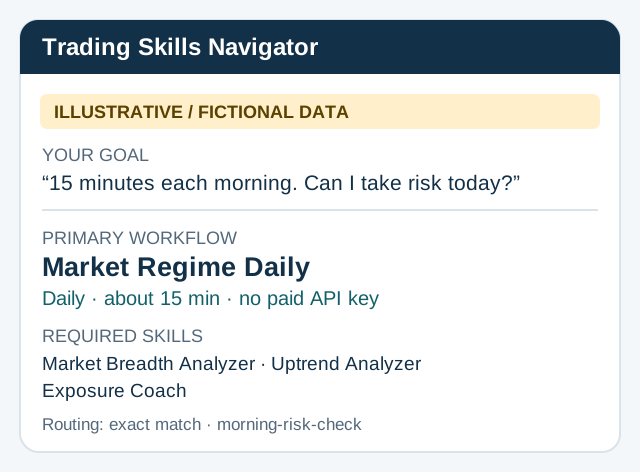
Find a starting path: Trading Skills Navigator recommends a workflow from your goal.
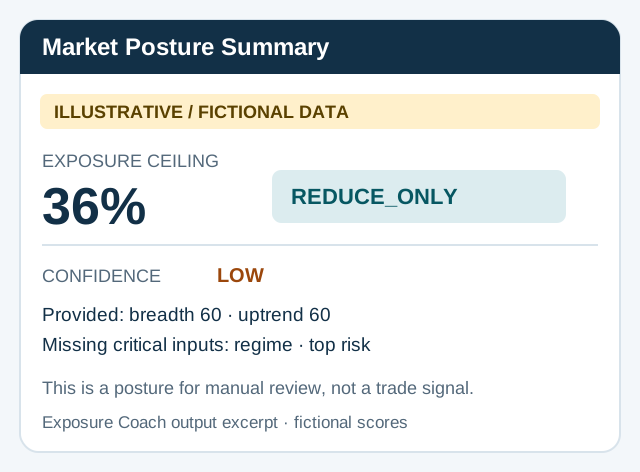
Review the daily posture: Market Regime Daily ends with a human decision gate.
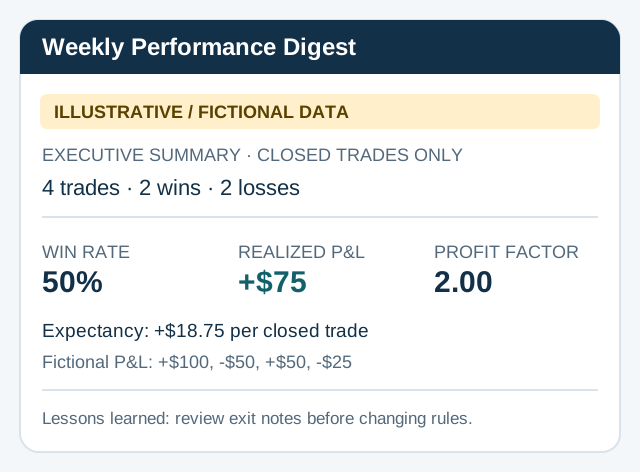
Review completed trades: Weekly Performance Digest summarizes outcomes and lessons.
Prerequisites
What this actually costs: Claude Web Skills are currently available on Free, Pro, Max, Team, and Enterprise accounts. Claude Code has separate account requirements and is not included with the Claude.ai Free plan. FMP, FINVIZ Elite, and Alpaca are optional or skill-specific integrations; the five-skill starter path does not require a paid market-data API subscription. Verify current access in Anthropic’s Skills help and Claude Code setup guide.
| Item | Required | Description |
|---|---|---|
| Claude Account | Yes | Claude Web account with Skills access, or a separately eligible Claude Code account |
| Python 3.10+ | Yes | Required for the shared repository environment. Standalone packaged skills may retain Python 3.9 support. Most skills use Python-based data fetching |
| FMP API Key | Optional | Financial Modeling Prep API. Required by screening skills (free tier available) |
| FINVIZ Elite | Optional | Speeds up dividend screeners 70-80% and improves Theme Detector coverage |
| Alpaca Account | Optional | Required only for Portfolio Manager skill (free paper trading available) |
Installation
Claude Web App
- Download the
.skillfile (ZIP format) for the skill you want from theskill-packages/directory. - For an individual account, open Settings > Capabilities and enable Code execution and file creation. Team and Enterprise users may need an organization owner to enable Skills.
- Open Customize > Skills and upload the downloaded
.skillfile. - Confirm that the skill appears in Customize > Skills, and enable it if needed.
See Anthropic’s current Skills help for account-specific setup and troubleshooting.
Claude Code (Desktop / CLI)
# 1. Clone the repository
git clone https://github.com/tradermonty/claude-trading-skills.git

# 2. Copy the desired skill folder to your personal Claude Code skills directory
mkdir -p ~/.claude/skills
cp -r claude-trading-skills/skills/finviz-screener ~/.claude/skills/

# 3. Restart only if the top-level skills directory was created after startup
Claude Code can also discover project-only skills from
.claude/skills/. See the Claude Code setup guide for supported accounts and installation.
.skillpackages are built from source folders with tests and local build artifacts omitted. Edit a source folder to customize a skill, then runpython3 scripts/package_skills.py --skill <skill-name>before distributing it via the web app.
API Key Setup
Financial Modeling Prep (FMP)
The primary data API used by most screening skills for fundamentals, quotes, and historical prices.
| Plan | Cost | API Calls/Day | Best For |
|---|---|---|---|
| Free | $0 | 250 | Occasional screening, small universes |
| Starter | $29.99/mo | 750 | Full CANSLIM screening (40 stocks) |
| Professional | $79.99/mo | 2,000 | Large-scale screening, multiple skills |
Sign up: https://site.financialmodelingprep.com/developer/docs
# Set via environment variable (recommended)
export FMP_API_KEY=your_key_here

# Or pass as a command-line argument when running scripts
python3 scripts/screen_canslim.py --api-key YOUR_KEY
FINVIZ Elite
Speeds up dividend screener execution (70-80% faster) and provides full industry coverage for Theme Detector.
| Plan | Cost | Notes |
|---|---|---|
| Monthly | $39.50/mo | Real-time data, fast API access |
| Annual | $299.50/yr (~$24.96/mo) | Best value with annual discount |
Sign up: https://elite.finviz.com/
export FINVIZ_API_KEY=your_key_here
Alpaca Trading
Required for Portfolio Manager to retrieve live holdings for analysis and rebalancing proposals. This read-and-analyze integration does not submit broker orders; separate human confirmation and execution are required.
| Plan | Cost | Notes |
|---|---|---|
| Paper Trading | Free | Simulated environment, full API access |
| Live Trading | Free (no commissions) | Stocks and ETFs |
Sign up: https://alpaca.markets/
export ALPACA_API_KEY="your_api_key_id"
export ALPACA_SECRET_KEY="your_secret_key"
export ALPACA_PAPER="true"  # set to "false" for live trading
Your First Skill – FinViz Screener
FinViz Screener is the easiest skill to try because it requires no API key. You describe screening criteria in natural language, and Claude builds a FinViz filter URL and opens the results in Chrome.
Example Prompt
Tell Claude:
Find stocks with EPS growth > 25% and price above SMA200
What Claude Does
- Parses your natural language and maps it to FinViz filter codes:
fa_epsqoq_o25(Quarterly EPS growth > 25%)ta_sma200_pa(Price above SMA200)
- Presents the selected filters in a table for your confirmation.
- Builds the URL and opens the FinViz screener results page in Chrome.
Expected Output
- Chrome opens with the FinViz Screener results matching your criteria.
- Stocks are displayed in a sortable table.
- Switch between Overview, Valuation, Financial, and Technical views for deeper analysis.
For advanced usage including Japanese input, programmatic mode, and 14+ pre-built recipes, see the FinViz Screener Guide.
Troubleshooting
Skill Not Loading
| Cause | Fix |
|---|---|
name field in SKILL.md does not match the folder name |
Verify that name in the YAML frontmatter exactly matches the skill folder name |
| Skill folder placed in the wrong directory | Confirm the folder is inside Claude Code’s Skills directory |
| Top-level skills directory created after this session started | Restart Claude Code once. Changes inside an existing skills directory are detected automatically |
API Key Errors
ERROR: FMP API key not found. Set FMP_API_KEY environment variable or use --api-key argument.
Fix:
- Verify the environment variable is set:
echo $FMP_API_KEY - Add
export FMP_API_KEY=your_keyto your shell config (.zshrcor.bashrc) and reload it - As a fallback, pass the key directly with
--api-key YOUR_KEY
Python Dependency Errors
ModuleNotFoundError: No module named 'requests'
Fix:
pip install requests beautifulsoup4 lxml pandas numpy yfinance
Required dependencies vary by skill. Check the Prerequisites section in each skill’s guide for specifics.
FMP API Rate Limit
ERROR: 429 Too Many Requests - Rate limit exceeded
Fix:
- The script automatically retries after 60 seconds.
- If you hit the free tier limit (250 calls/day), it resets at midnight UTC.
- Reduce the analysis scope with
--max-candidatesto lower API usage. - For frequent use, consider upgrading to FMP Starter ($29.99/mo, 750 calls/day).